Open SourceDesignFoundation
SwiftUI Design System · Swift 6 · MIT

Token-based SwiftUI from the ground up.

Production-grade design system for iOS and macOS. Token-based theming, style-swappable components, Liquid Glass support, and full Swift 6 concurrency safety — built to swap visual styles without changing component code.

$.package(url: "https://github.com/NerdSnipe-Inc/design-foundation", from: "1.0.0")
Swift 6
Concurrency
SwiftUI
Framework
MIT
License
What's inside

Token-based theming

All visual decisions — colors, spacing, radii, shadows, typography — live in design tokens. Swap a theme at runtime without touching component code.

Style-swappable components

Components accept a style parameter rather than hardcoding visual choices. Ship multiple visual variants of the same component from a single codebase.

Liquid Glass support

Native Liquid Glass material integration for components that use the translucent, depth-aware surface treatment available on visionOS and modern iOS.

Swift 6 concurrency safe

Fully audited for Swift 6 strict concurrency. No data races, no Sendable warnings. Safe to use with async/await and Swift actors without suppressing compiler checks.

iOS and macOS targets

Components adapt to both platforms. Platform-specific idioms (navigation patterns, sizing, tap vs hover states) are handled inside the system, not in your app code.

Documentation site

Full component reference, token documentation, and integration guides at the DesignFoundation docs site. Every component shows live code examples alongside rendered output.

43 components, 9 modifiers, 5 themes

Content-row primitives for feeds and article lists, chips, ratings, price displays, entity rows/cards, grids, carousels, a Cmd-K command palette, and five preset visual identities — Slate, Aurora, Copper, Sage, and Garnet.

Swift Package Manager
Package.swift dependency
$.package(url: "https://github.com/NerdSnipe-Inc/design-foundation", from: "1.0.0")
Xcode — File → Add Package Dependencies
$https://github.com/NerdSnipe-Inc/design-foundation

Requires Xcode 16 or later and Swift 6. Add DesignFoundation as a target dependency after adding the package.

Theme presets

Each preset ships a light and dark theme in a single image. The dfThemePreset() modifier reads the system color scheme and switches automatically — no conditional logic in your views.
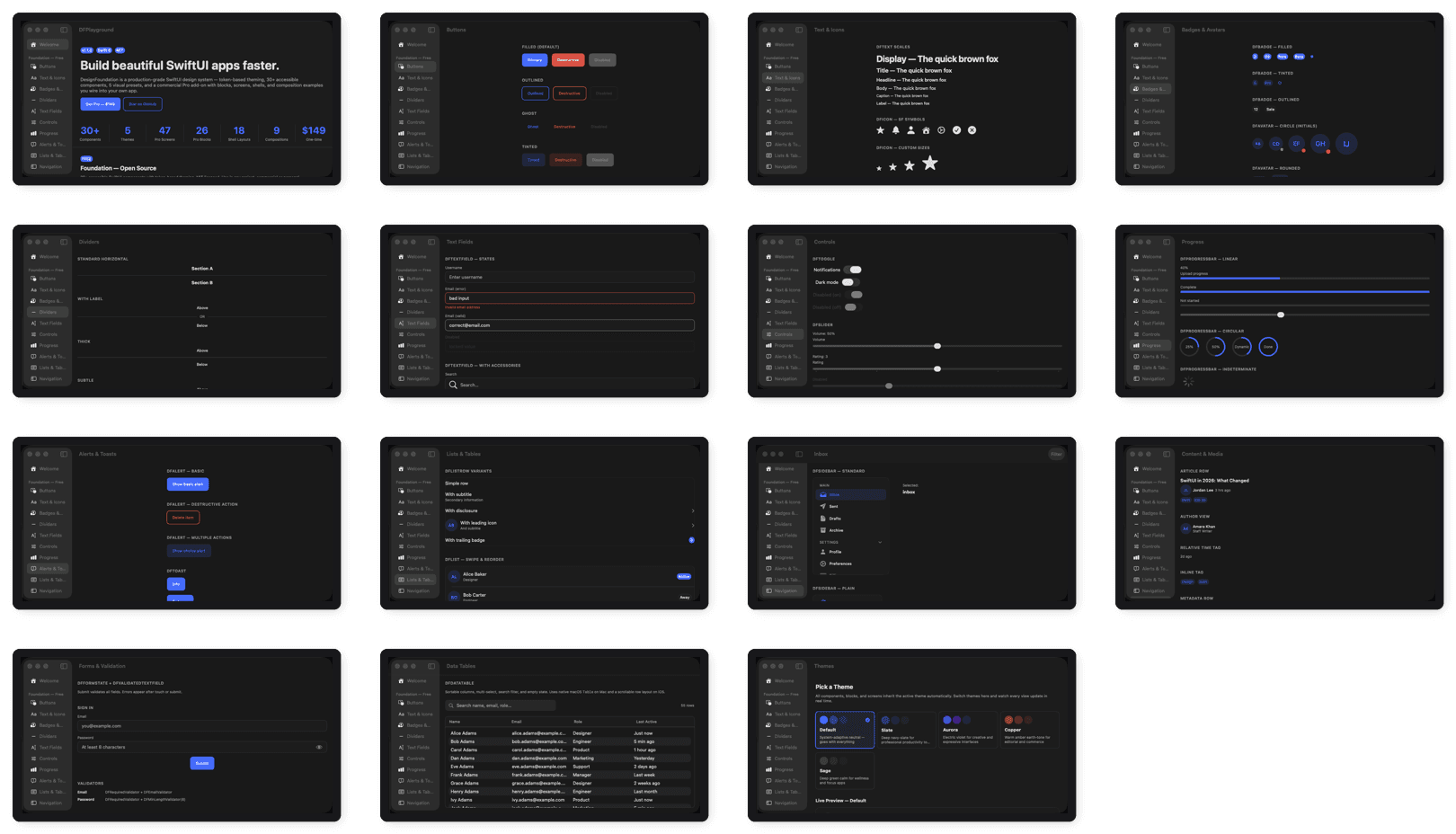
Every Foundation primitive, badges to data tables, in one strip

43 components + 9 feedback/overlay modifiers — the full free-tier catalog, browsable live in DFPlayground.
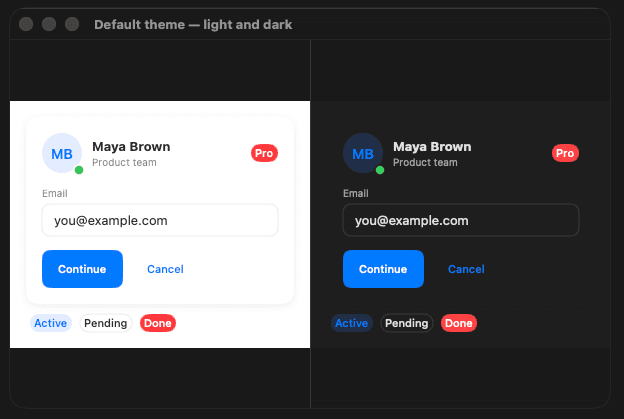
Default theme — light and dark side by side

Default — System semantic colors. Fully adaptive, no preset required.
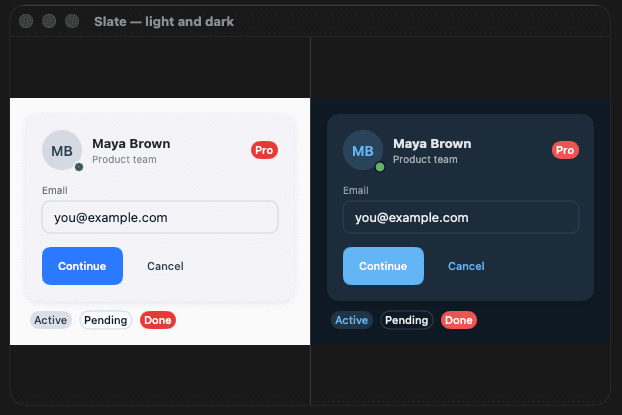
Slate preset — light and dark side by side

.slate — Professional, navy-slate brand. Default radius and shadows. Best for SaaS dashboards and developer tools.
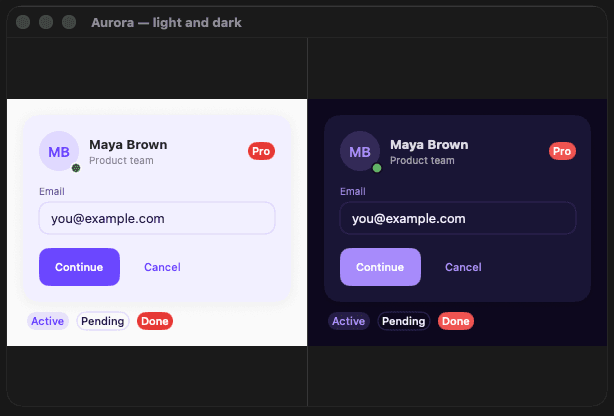
Aurora preset — light and dark side by side

.aurora — Electric violet. Rounded corners, soft shadows. Best for creative tools and consumer apps.
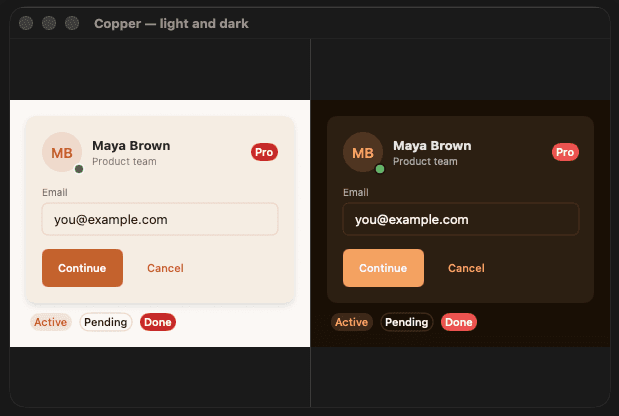
Copper preset — light and dark side by side

.copper — Warm amber on cream. Sharp corners, defined shadows. Best for finance and premium lifestyle apps.
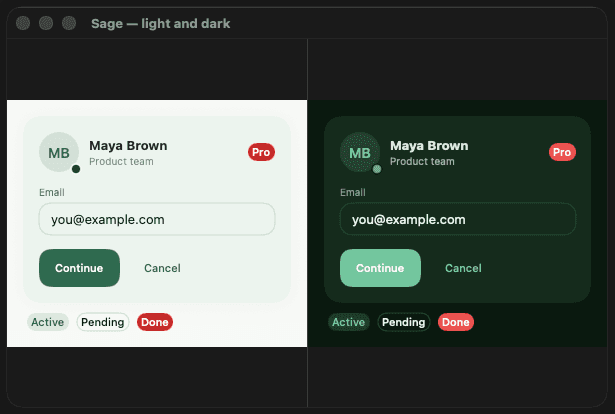
Sage preset — light and dark side by side

.sage — Deep sage green. Very rounded corners, airy shadows. Best for health, wellness, and lifestyle apps.

Design philosophy

Theming should be a config file, not a refactor.

Most SwiftUI design systems hardcode visual choices into components. Changing a border radius means finding every component that uses it. DesignFoundation inverts this — components reference tokens, tokens reference the current theme.

You can ship a light theme, a dark theme, a high-contrast accessibility theme, and a branded white-label theme from the same component library without duplicating any logic.

Need full screens instead of primitives? DesignFoundationPro adds 55 production-ready screens, 30 composite UI blocks, and 18 shell layouts on top of this same token system.

Frequently asked

How do I avoid hardcoding colors and fonts throughout a SwiftUI app?

The fix is to route every visual decision through a central theme object instead of calling Color(...) or .font(...) directly in views, so a single change propagates everywhere. DesignFoundation builds this in: colors, spacing, radii, shadows, and typography live in design tokens, and components read from a DFTheme in the environment rather than hardcoding values.

What's the best pattern for runtime theme switching in SwiftUI without a big refactor?

If your components already read from tokens instead of literal values, runtime theme switching becomes a single modifier at the app root rather than an architecture change. DesignFoundation's dfTheme() and dfThemePreset() modifiers inject a theme into the SwiftUI environment, and every component picks up the change automatically, including light/dark switching.

How do I keep a SwiftUI app's design consistent as more developers join the codebase?

Consistency usually breaks down when each developer makes their own call on a color, radius, or spacing value inline. Centralizing those decisions in a shared token set removes the guesswork: everyone references the same named tokens instead of inventing new ones. DesignFoundation ships a focused, opinionated token vocabulary for exactly this, so the team argues about the theme once instead of in every PR.

Is there a free, open-source SwiftUI design token or theming system instead of building my own from scratch?

Yes. DesignFoundation is a free, MIT-licensed SwiftUI package with a full token system (colors, spacing, radius, typography, shadows, animation) and a style-swapping pattern modeled on SwiftUI's own ButtonStyle. It's extracted from real production apps, not a greenfield demo, so the token set reflects patterns that actually held up in shipping software.

How do I support Liquid Glass on iOS 18+ and visionOS without writing platform-specific styling code everywhere?

The cleanest approach is to treat Liquid Glass as another entry in your token vocabulary (a .glass style) rather than sprinkling #if os(visionOS) checks through your views. DesignFoundation has native Liquid Glass material support built into its style system, so components can opt into the translucent, depth-aware surface with the same modifier pattern used for every other style.

Does it work on visionOS?

Liquid Glass support is built in, which is the primary new surface treatment on visionOS. Component support for the full visionOS layout model is in progress.

Can I use it alongside existing SwiftUI code?

Yes. DesignFoundation components are standard SwiftUI Views. Adopt them incrementally — you don't need to rewrite existing screens to start using the token system.

Is this the same design system used in NerdSnipe's own apps?

Yes — DesignFoundation was extracted from production iOS development work at NerdSnipe Inc. It is used in shipping apps before being open-sourced.

Is there a paid version with more than primitives?

Yes — DesignFoundationPro is a commercial add-on with 55 full app screens across 12 verticals, 30 composite UI blocks, and 18 shell layouts, all built on this same free token system. One-time purchase, unlimited projects.

Consistent UI that scales.

Token-based theming, Swift 6 safe, Liquid Glass ready. One design system, multiple themes, no component rewrites.